
Customizing the lobby
The lobby used as the game’s spawn area can be changed by entering the lobby and running /bingo lobby edit.
This will enter creative mode, where you can place blocks, paste structures, spawn entities, or make any other changes. Any other operators on the server will also enter creative, while players will be forced into spectator mode.
Once done, you can run /bingo lobby save to keep your changes, or /bingo lobby cancel to discard and return to the lobby.
File Location
Section titled “File Location”If needed, you can find the saved lobby file in ./config/yet-another-minecraft-bingo/lobby_world.zip. If this is deleted, the mod will revert to the default lobby_world.zip.
Directoryconfig
Directoryyet-another-minecraft-bingo/
- lobby_world.zip
Lobby Behavior
Section titled “Lobby Behavior”When the server starts up, it looks for specific blocks in a 48x48 box around the world origin to use for specific functionality…
Spawnpoint
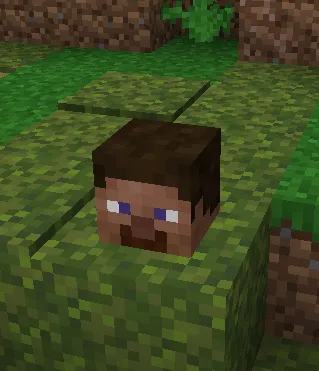
Section titled “Spawnpoint”The world spawn can be changed by placing a minecraft:player_head at the location you want players to spawn
in the lobby.
Game Menu
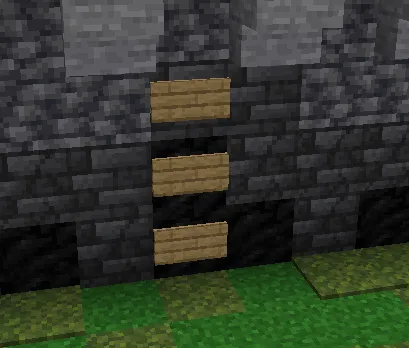
Section titled “Game Menu”The game menu looks for three vertical minecraft:oak_wall_sign (an oak sign placed against a wall) blocks
to set its position. It has a total height of 4 blocks and a width of 14.
Team Pickers
Section titled “Team Pickers”The “team picker” entities can be created by placing a colored carpet on top of a lodestone block.
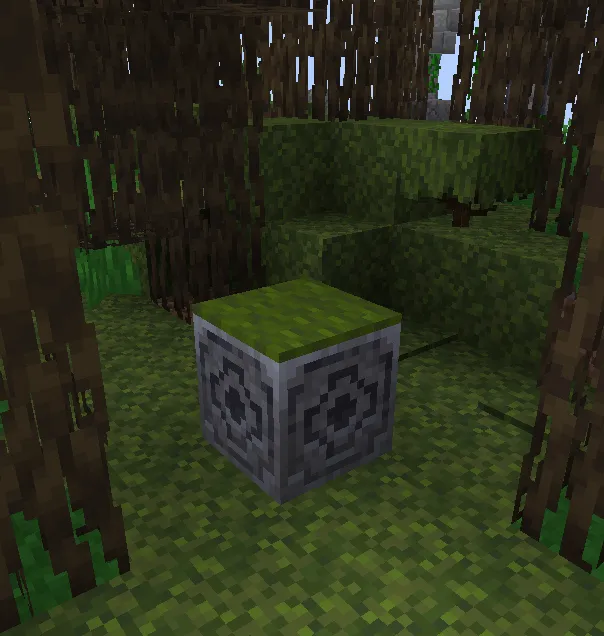
This only works for the set teams included in the mod; i.e.
- Blue Team (
minecraft:blue_carpet) - Red Team (
minecraft:red_carpet) - Green Team (
minecraft:green_carpet) - Yellow Team (
minecraft:yellow_carpet) - Pink Team (
minecraft:pink_carpet) - Aqua Team (
minecraft:cyan_carpet) - Orange Team (
minecraft:orange_carpet) - Gray Team (
minecraft:light_gray_carpet)
The statistics menu will activate whenever a player walks over an iron pressure plate. It will look for the nearest armor stand entity and spawn its other display entities around it.